Rediseño de baños con IA: ve cada azulejo, grifo y acabado antes de gastar un euro
La reforma de baño promedio cuesta entre $11,000 y $15,000 y, según los datos de Angi sobre reformas de baño (cifras del mercado estadounidense), los proyectos de gama media a menudo superan los $20,000 en cuanto se suman el azulejo, la grifería y la mano de obra. Para una habitación que normalmente no llega a los 5 metros cuadrados, es un desembolso considerable. Lo que lo hace todavía más difícil: el baño es, de toda la casa, la habitación donde más se concentra el arrepentimiento tras una reforma. El azulejo de suelo que en la tienda parecía marfil cálido se ve blanco puro bajo la luz de tu lavabo. El grifo negro mate que pediste por internet desentona con la barra de toallas en níquel cepillado que olvidaste cambiar. No son errores del contratista. Son fallos de visualización, y el rediseño de baños con IA está pensado precisamente para resolver eso.
Las 5 decisiones que determinan el éxito de un rediseño de baño
El baño es una habitación pequeña con una densidad altísima de decisiones que se cruzan entre sí. Todas las superficies están al alcance de la mano, así que cualquier desajuste resulta imposible de ignorar. Cinco elecciones determinan casi todo el resultado.
- El color y el patrón del azulejo marcan la temperatura de toda la habitación (cálida, fría o neutra) y son la decisión más cara de deshacer, porque el azulejo queda fijado con mortero.
- El estilo del mueble de lavabo decide si la habitación se lee como clásica, contemporánea o de transición, y un perfil equivocado hace que hasta el mejor azulejo parezca anticuado.
- El acabado de la grifería es el detalle que une o rompe el conjunto: cromo, níquel cepillado, negro mate y latón pulido cuentan historias distintas, y mezclarlos sin intención se nota como un descuido.
- La iluminación cambia cómo se lee cada superficie: ese azulejo blanco cálido que elegiste puede sorprenderte, y no para bien, bajo unos LED de luz fría.
- Las decisiones de distribución, como mantener la bañera o sustituirla por una ducha a ras de suelo, son las más difíciles de revertir y las que más a menudo la gente desearía haber tomado de otra forma.
El motivo por el que estas decisiones son tan difíciles de acertar es que las tiendas y las muestras no reproducen la luz, el tamaño ni el contexto específicos de tu habitación. Siempre estás calculando a ciegas, y el baño castiga esos cálculos más que cualquier otra habitación.
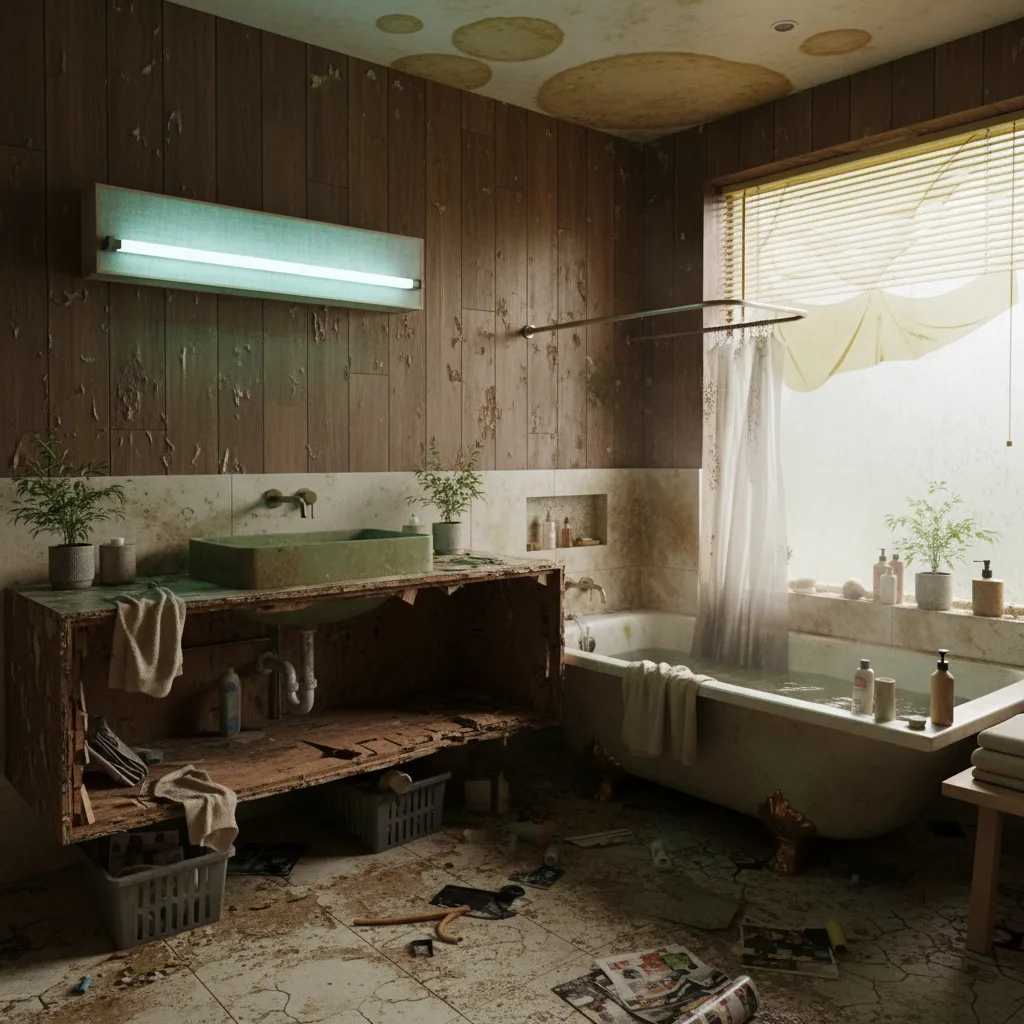
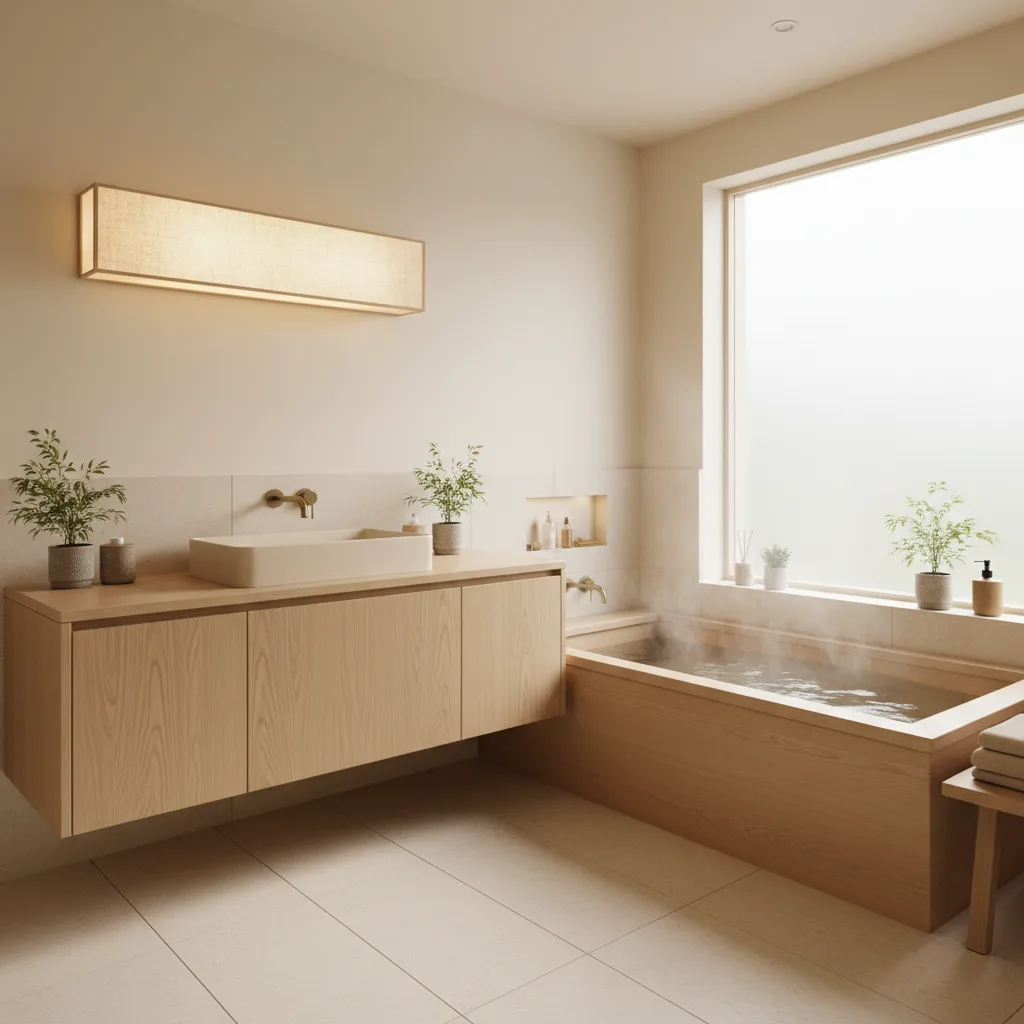
Qué puedes probar de verdad con el rediseño de baños con IA
Revamp AI toma una foto de tu baño actual y genera una imagen fotorrealista de esa misma habitación rediseñada en el estilo que elijas. No es una imagen genérica de catálogo de un baño bonito. Es tu baño: tus paredes reales, la posición real de tu ventana, la altura real de tu techo, con el nuevo diseño aplicado encima.
Puedes recorrer seis estilos distintos en cuestión de minutos: Moderno, Spa, Rústico, Industrial, Costero y Glam. Cada estilo cambia los materiales, la grifería y los acabados de un modo que refleja cómo lo construirían los diseñadores de verdad, no un simple filtro de color. Moderno significa vidrio sin marco, mueble de lavabo suspendido y herrajes mate. Spa significa piedra natural, toques de madera cálida y una paleta apagada. Rústico significa una pared con friso de madera, bronce envejecido y una bañera exenta. Ves el conjunto completo, no una parte suelta.
Lo que no puede hacer es generar medidas exactas ni especificaciones de construcción. Piensa en él como una herramienta de confirmación de estilo: responde a "¿de verdad me gusta esta dirección en mi espacio concreto?" antes de que tengas que responder a "¿puedo ejecutarlo dentro de mi presupuesto?". Esas dos preguntas van en ese orden, y la mayoría del arrepentimiento en una reforma viene de invertirlo.
El azulejo que te enamoró en la tienda nunca está iluminado igual que tu baño. La única vista previa fiable es la que se coloca en tu espacio real.
¿Baño pequeño? Ahí es donde más ayuda la IA
Los baños pequeños son las habitaciones más difíciles de rediseñar con confianza porque la escala engaña en las tiendas. Un azulejo de gran formato de 30×60 cm, expuesto en un panel de casi 2,4 metros, se ve espectacular y amplio. En un baño de 3,7 metros cuadrados, ese mismo azulejo puede saturar la habitación o hacer que las líneas de junta parezcan arbitrarias. Un azulejo tipo metro en la misma habitación podría crear justo el ritmo ligero y proporcionado que buscabas.
La IA renderiza tu baño a su tamaño real. Cuando aplicas un azulejo de gran formato, se ajusta a tus paredes reales, así que puedes ver de inmediato si el azulejo hace que la habitación se sienta más grande o simplemente recargada. Lo mismo ocurre con las mamparas de ducha sin marco, que abren visualmente un baño pequeño, y con las paredes de acento oscuras, que pueden anclar un espacio diminuto o asfixiarlo según la altura del techo. No lo sabes hasta que lo ves en tu propia habitación.
Si tu baño mide menos de 5,6 metros cuadrados (y la mayoría de los baños principales en viviendas construidas antes de 1990 los miden), este es el uso individual de mayor valor del rediseño con IA. Estás tomando decisiones caras y permanentes en un espacio donde el margen de error es cero, y nada en una tienda ni en Pinterest te dice cómo se sienten esas decisiones a tu escala.
Las fases de una reforma de baño y cuándo cerrar cada decisión
Una reforma de baño tiene tres fases en las que una decisión equivocada se vuelve costosa de revertir. La IA te ayuda a llegar a cada fase con respuestas, no con suposiciones.
Antes del derribo: distribución y fontanería
Antes de empezar la demolición, necesitas saber si vas a conservar la bañera, dónde irá la ducha y si el inodoro se va a mover. Cambiar cualquier punto de fontanería una vez cerradas las paredes cuesta entre $500 y $1,500 por elemento solo en repetir el trabajo. Usa los renderizados de IA en esta fase para probar la decisión entre bañera y ducha: mira cómo se ve una ducha a ras de suelo en tu habitación frente a una bañera de inmersión, y decide la distribución antes de que entre el mazo.
Antes de pedir el azulejo: visualización completa de la pared
El azulejo suele ser el elemento con el plazo de entrega más largo en una reforma de baño, y también el más caro de cambiar una vez instalado. Cierra tu elección de azulejo antes de pedirlo, no durante la demolición. Prueba varios estilos de azulejo con IA (tipo metro, gran formato, mosaico, cemento) sobre tus paredes reales, para ver cómo se lee el patrón a escala y cómo encaja con la dirección de tu mueble de lavabo.
Antes de pintar: la combinación de color y junta
La pintura es la decisión más barata de un baño y también la que más se repite porque se eligió mal el subtono. El blanco nunca es solo blanco en un baño: se ve cálido, frío o grisáceo según el subtono de tu azulejo y tu fuente de luz. La IA te permite probar la combinación completa de pared y junta antes de abrir un bote, lo que elimina el error de pintura más común en los baños.
Los estilos que mejor funcionan en la mayoría de los baños (y cómo reconocer cada uno)
Saber qué transmite realmente cada estilo, no solo cómo se ve en una foto, te ayuda a decidir más rápido en cuanto empieces a probarlos con IA.
Moderno
Las señas de identidad: mueble de lavabo suspendido, mampara de ducha sin marco, azulejo de gran formato con líneas de junta mínimas, herrajes mate o cepillados. Los baños modernos se ven limpios y amplios porque eliminan el ruido visual. Funcionan especialmente bien en baños pequeños, porque un mueble de lavabo suspendido deja a la vista suelo que el ojo interpreta como metros cuadrados extra.
Spa
Las señas de identidad: piedra natural o azulejo con aspecto de piedra, tonos de madera cálida en el mueble o en una bandeja de baño, una paleta apagada de gris beige, crema y salvia suave, iluminación cálida. Los baños estilo Spa son el estilo con mayor satisfacción en las encuestas posteriores a la reforma, porque se sienten intencionados sin resultar pasajeros. El riesgo: si eliges piedra natural de verdad, presupuesta el sellado y el mantenimiento; la piedra sin sellar en una zona húmeda se estropea rápido.
Rústico
Las señas de identidad: bañera con patas o exenta, pared con friso de madera, azulejo tipo metro, grifería en negro mate, mueble de lavabo en madera cálida. Los baños rústicos quedan preciosos en foto y transmiten calidez y vida. El reto es que exigen coherencia total en los materiales: un solo toallero cromado en un baño rústico de negro mate se lee como un proyecto sin terminar.
Industrial
Las señas de identidad: azulejo de cemento o hidráulico, acabados metálicos vistos, estanterías abiertas, junta oscura, grifería en negro mate. El industrial es el estilo más indulgente para un baño imperfecto, porque la textura y el contraste ocultan pequeños defectos que un acabado moderno y brillante dejaría al descubierto. Además, resulta ser una de las direcciones más económicas, porque evita deliberadamente los materiales muy brillantes u ornamentados.
Costero
Las señas de identidad: azulejo blanco tipo metro, toques en azul o verde agua, texturas de fibras naturales, madera clara o mueble de lavabo blanqueado, herrajes en níquel cepillado. Los baños costeros transmiten calma sin esfuerzo, pero es fácil pasarse: apuesta por toques de azul suave en lugar de un azul marino saturado, y mantén la junta clara para que la habitación respire.
Si quieres entender cómo aplica la IA estos estilos a cualquier habitación, no solo a los baños, lee nuestro análisis a fondo sobre cómo funciona el rediseño de habitaciones con IA. Y si estás reformando para vender, la misma lógica de visualización se aplica al home staging: nuestra guía sobre el home staging virtual con IA para inmobiliarias explica cómo presentar espacios que conecten con los compradores antes de publicar el anuncio.
Pruébala gratis con Revamp AI
Para seguir leyendo: Cómo funciona el rediseño de habitaciones con IA · Home staging virtual con IA para inmobiliarias
Preguntas habituales
Preguntas frecuentes
La visualización de baños con IA es fiable para las decisiones de estilo (color de azulejo, patrón, estilo de mueble de lavabo y acabado de grifería), y todo eso se renderiza con claridad en el contexto de tu habitación real. No es un documento de construcción y no sustituye a las muestras físicas para igualar un color con exactitud. Úsala para confirmar qué dirección de estilo es la adecuada para tu espacio antes de comprometerte con materiales físicos.
Sí, y los baños pequeños son precisamente donde la visualización con IA aporta más valor. Como el renderizado conserva las dimensiones reales de tu habitación, puedes ver cómo se ajusta un azulejo de gran formato a tus paredes reales, si un mueble de lavabo suspendido abre visualmente el suelo y si una mampara de ducha sin marco hace que la habitación se sienta más grande, antes de gastar nada en comprobarlo en persona.
Revamp AI aplica cada estilo de diseño (Moderno, Spa, Rústico, Industrial, Costero y Glam) con las elecciones de azulejo características de ese estilo. Verás azulejo tipo metro en los renderizados Rústico y Costero, azulejo de gran formato con aspecto de piedra en los renderizados Spa y Moderno, y azulejo de cemento o hidráulico en los renderizados Industrial, todo aplicado sobre las paredes reales de tu baño.
Colócate en la puerta o en una esquina para captar al menos dos paredes en el encuadre. Enciende todas las luces de la habitación, abre las persianas para dejar entrar luz natural y despeja de objetos personales las encimeras y el suelo. La IA trabaja con lo que ve en la foto: una toma bien iluminada y despejada te da un renderizado mucho más limpio y preciso que una foto oscura o recargada.